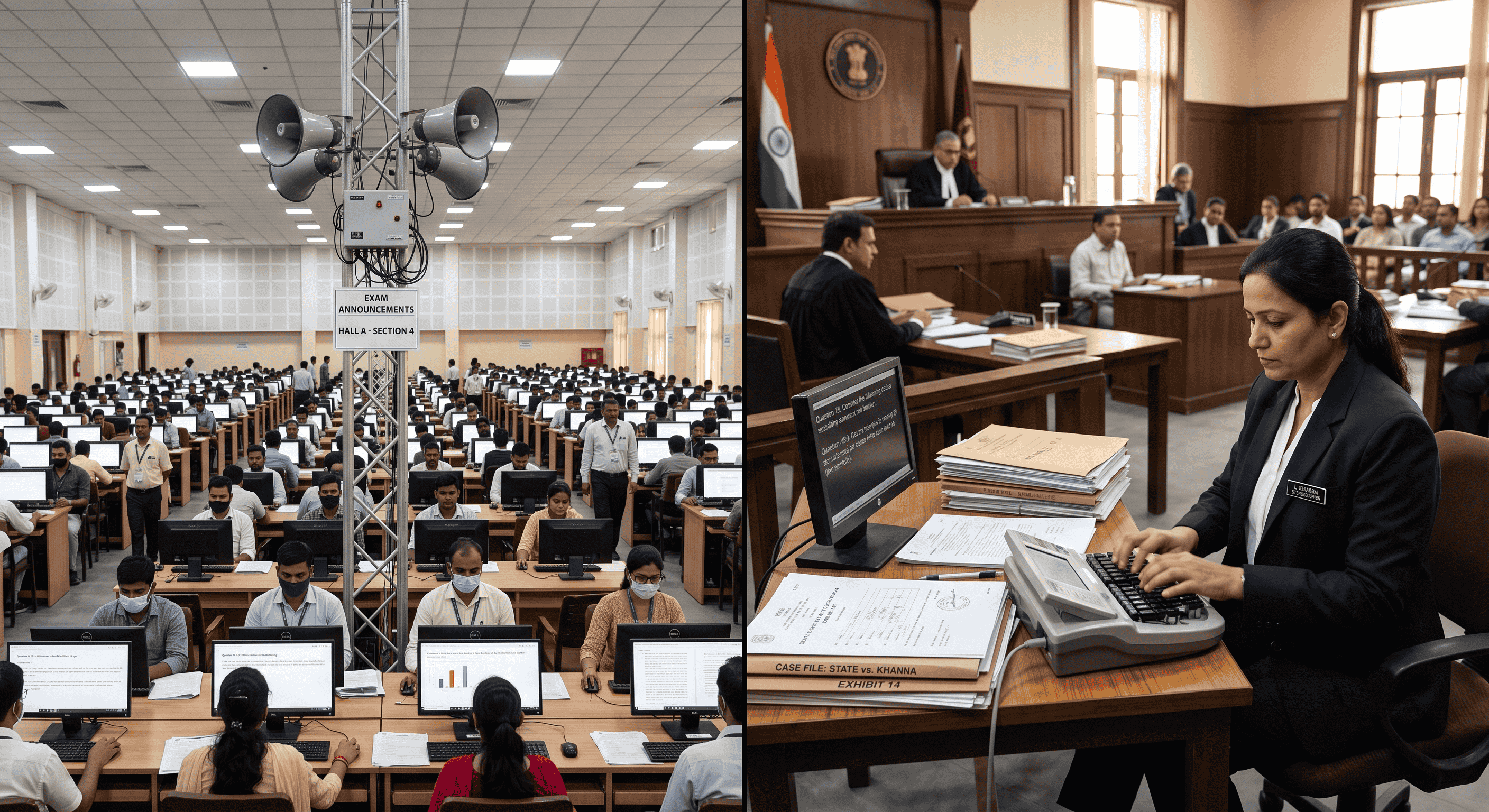
SSC vs. High Court Skill Tests: A Side-by-Side Comparison
Every year, thousands of aspirants dedicate countless hours to Government Exam Preparation, aiming for a prestigious career as a stenographer. While the foundational skills remain the same, the practical application of those skills varies wildly depending on the exam you are taking. For those practicing their Pitman Shorthand and preparing for the final hurdle, the ultimate question often becomes: how does the SSC Stenographer skill test compare to a High Court stenographer skill test?
Both exams require high Typing Speed and flawless Typing Accuracy. However, the dictation environment, software interfaces, keyboard quality, and automated evaluation logic differ significantly. Whether you are focusing on an English Typing Test or a Hindi Typing Test using Kruti Dev Typing or Mangal Typing, understanding these differences is the key to passing.
In this comprehensive guide, we will break down the exact differences between these two major examinations, providing you with the insights you need to tailor your Online Typing Practice effectively.
Why Understanding the Difference Matters
Approaching both exams with the exact same strategy is a recipe for disaster. The Staff Selection Commission (SSC) tests your ability to transcribe general, parliamentary, or editorial matters at 80 WPM (Grade D) or 100 WPM (Grade C). High Courts, such as the Allahabad High Court, test your ability to handle complex legal terminology, rigid document formatting, and highly specific typing rules.
If you have only been practicing generic Shorthand Dictation without understanding the underlying evaluation logic of each exam body, you might lose precious marks to half-mistakes, spacing errors, or Alt-code misfires. Knowing the battleground before you enter it allows you to configure your Free Shorthand Typing practice sessions to mirror the actual exam environment.
Dictation Environment: SSC Halls vs. High Court Rooms
The SSC Dictation Setup
SSC exams are typically conducted in large exam centers (often engineering colleges or digital test centers). The dictation is almost always a pre-recorded audio track played over centralized loudspeakers in a large hall.
- Audio Quality: Because of the large room size, there can be an echo. The audio is standard, but background noise (coughing, fan noise, typing sounds from hundreds of keyboards) is a major factor.
- Speaker Accents: SSC dictations are usually recorded by professional readers with clear, neutral Indian accents at a steady, unvarying pace.
- Content: Speeches of politicians, budget sessions, or editorial columns.
The High Court Dictation Setup
High Court skill tests can be much more unpredictable. While some use recorded audio, many are still dictated live by a judicial officer, registrar, or designated examiner in a smaller, sometimes more intimate room.
- Audio Quality: Live dictation means dealing with the natural fluctuations of human speech. The speaker might speed up, slow down, clear their throat, or have a distinct regional accent.
- Content: Heavy legal terminology, Latin maxims (e.g., res judicata, prima facie), case numbers, and complex punctuation.
- Atmosphere: Highly formal and highly stressful. You must be prepared to catch complex words that are rarely found in a standard Pitman Exercise.
Software Strictness and Keyboard Realities
Navigating the Typing Interface
When you sit down to transcribe your notes into the computer, the software interface plays a massive role in your success.
In the SSC Typing Test, the interface is relatively straightforward. You type into a text box, and while the backspace key is usually permitted, over-relying on it will destroy your Typing Speed. The SSC relies on robust automated evaluation logic that compares your final text string against the master copy.
Conversely, High Court exams are notorious for their strict interfaces. Some court exams completely disable the backspace key or restrict navigation arrows. If you make a mistake, it stays. This is where precision becomes more important than raw speed. Furthermore, the UI might require you to navigate individual, separate thin scroll bars for different data areas—a feature you must be comfortable with to avoid losing your place in the text.
The Keyboard Challenge
Never expect a smooth, mechanical keyboard in a government exam hall. You will likely encounter stiff, clunky, and heavily used membrane keyboards. If you are preparing for a Hindi Typing Test, this is where mastering your specific font mapping is critical. Whether you are using Kruti Dev or Mangal Unicode, the mapping constants must be embedded in your muscle memory. If a key is stiff and fails to register a complex Alt-code (like generating specific half-letters), your word count drops. Practice hitting the keys deliberately and firmly during your Online Typing Practice sessions.
Evaluation Strictness: Error Margins and Formatting
SSC: The Formulaic Approach
The SSC employs a mathematical approach to error calculation. They categorize errors into Full Mistakes (omission of a word, substitution of a word, addition of a word) and Half Mistakes (spelling errors, singular/plural errors, capitalization errors).
For SSC Grade D, general candidates are allowed up to 7% mistakes, while reserved categories might get up to 10%. For Grade C, it drops to 5% and 7%. The system focuses purely on the accuracy of the transcribed text against the master script.
High Court: Formatting is Everything
High Courts demand absolute perfection, not just in spelling, but in presentation. Allahabad High Court Formatting, for example, is notoriously strict. You aren't just typing; you are formatting legal judgments.
- Indentation: Missing a tab space at the start of a paragraph can result in heavy penalties.
- Capitalization: Legal terms like "Hon'ble Court", "Plaintiff", and "Defendant" must be capitalized exactly as required.
- Punctuation: Commas, full stops, and hyphenated legal terms are scrutinized closely.
Step-by-Step Guide to Prepare for Both Exams
- Master the Basics: Complete every Pitman Exercise diligently to build a solid foundation. You cannot build speed on shaky outlines.
- Simulate the Environment: Use Free Shorthand Typing tools to take dictations with background noise playing on your phone. Train your ears to filter out distractions.
- Vary Your Dictations: Alternate daily between parliamentary debates (for SSC) and legal judgments (for High Courts).
- Lock Down Your Keyboard Settings: If typing in Hindi, ensure you know your font mappings flawlessly. Practice converting your mental outlines seamlessly into Kruti Dev Typing or Mangal Typing.
- Analyze Your Automated Evaluation: Don't just look at your final WPM. Dive into the results to see if you are making full mistakes or half mistakes. Adjust your practice based on data.
Practical Examples of Skill Test Scenarios
Scenario A (SSC): The audio says, "The government has proposed a new budget." You type, "The government have proposed a new budget." Result: This is a half-mistake (grammatical/tense error) in the SSC automated evaluation logic.
Scenario B (High Court): The audio says, "The Hon'ble Supreme Court dismissed the appeal." You type, "The hon'ble supreme court dismissed the appeal." Result: In a High Court exam, failing to capitalize "Hon'ble Supreme Court" can be treated as a severe formatting error or multiple full mistakes, instantly tanking your score.
5 Common Mistakes to Avoid
- Ignoring Alt-Codes: In Hindi typing, failing to memorize Alt-codes for complex characters guarantees half-mistakes.
- Practicing in Silence: The exam hall will be noisy. Practicing in a silent room leaves you vulnerable to distraction.
- Over-using Backspace: Relying on backspace ruins your rhythm. Practice typing with the backspace key physically removed from your keyboard.
- Guessing Outlines: If you miss a word during Shorthand Dictation, leave a space and move on. Guessing often leads to substituting a completely wrong word (a Full Mistake).
- Neglecting Reading Time: SSC gives you a few minutes to read your shorthand notes before typing. Use this time to insert punctuation and clarify messy outlines.
Quick Comparison Table
| Feature | SSC Stenographer | High Court Stenographer |
|---|---|---|
| Dictation Audio | Pre-recorded, standardized accent. | Often live dictation, varying speeds and accents. |
| Content Type | Parliamentary, speeches, editorial. | Legal judgments, complex legal terminology. |
| Typing Interface | Standard text box, backspace usually allowed. | Strict UI, backspace often restricted, formatting matters. |
| Evaluation Focus | Raw word accuracy (Full vs Half mistakes). | Accuracy PLUS strict document formatting. |
Frequently Asked Questions (FAQ)
1. Which typing font is required for the SSC Hindi skill test?
The SSC generally allows candidates to choose between Kruti Dev and Mangal Unicode font layouts. You must specify your choice before the exam.
2. Is the backspace key allowed in the Allahabad High Court skill test?
Historically, High Courts have been much stricter, often disabling the backspace key or heavily penalizing its use. Always prepare as if it will be disabled.
3. How are half mistakes calculated in SSC?
Half mistakes typically include spelling errors, missing punctuation that changes the meaning, capitalization errors, and singular/plural mix-ups. Two half mistakes equal one full mistake.
4. Can I use a mechanical keyboard in the exam?
No. You must use the standard membrane keyboard provided by the test center. They are often stiff, so practice on a basic, inexpensive keyboard at home.
5. Is Pitman Shorthand the only accepted method?
While Pitman Shorthand is the most widely taught and used, the examiners only grade your final typed English/Hindi transcription. They do not read your shorthand notebook, so any system you are fluent in is acceptable.
6. How many WPM do I need for SSC Grade C?
For SSC Stenographer Grade C, you must take shorthand dictation at 100 WPM and transcribe it within the allotted time frame.
7. How can I improve my Allahabad High Court Formatting?
Study previous court judgments. Pay attention to how paragraphs are indented, how legal parties are addressed, and where specific punctuation is placed. Use the Free Shorthand Typing platform to simulate these specific layout requirements.
8. Does automated evaluation logic catch formatting errors?
Yes. Modern exam software maps your keystrokes precisely. If the master script requires a Tab space for indentation and you use five Spacebar strokes instead, the system's logic will flag it as a formatting error.
Final Conclusion
Successfully clearing a shorthand skill test requires more than just fast fingers; it requires strategic preparation tailored to the specific exam body. The SSC Stenographer exam tests your endurance and raw accuracy under the pressure of a crowded hall, while a High Court exam tests your precision, legal vocabulary, and formatting discipline in a highly formal environment.
By understanding the dictation environments, strict software evaluation logic, and exact rules for full and half mistakes, you can stop practicing blindly and start practicing smartly. Whether you are typing in English or mastering the complexities of Kruti Dev and Mangal fonts, consistent, targeted practice is your only path to success.
Ready to elevate your typing and shorthand skills? Take advantage of India's most comprehensive Edu-Tech ecosystem for stenographers. Visit Free Shorthand Typing today to access live dictations, typing tests, and expert formatting tools designed specifically for Government Exam Preparation!
Popular Tags:
- SSC Stenographer
- High Court Steno
- Skill Test Guide
- Typing Speed
- Typing Accuracy
- Shorthand Dictation
- Pitman Shorthand
- Allahabad High Court
- Hindi Typing
- English Typing
- Kruti Dev
- Mangal Font
- Government Jobs
- Exam Preparation
- Typing Rules
- Court Dictation
- Steno Transcription
- Typing Software
- Exam Environment
- Steno Tips